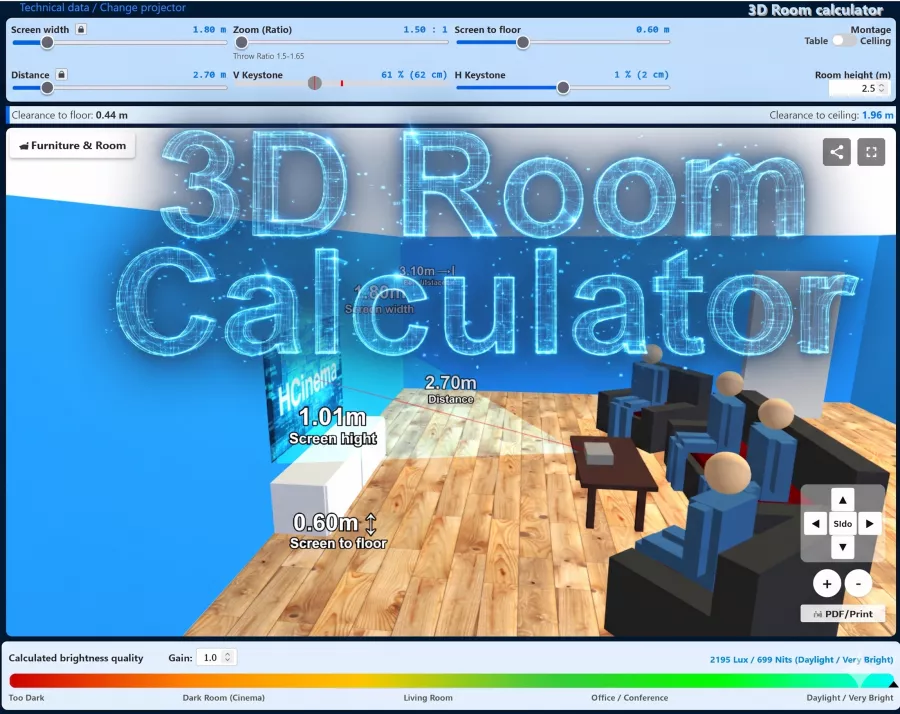
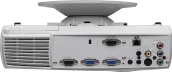
As a projector for the Standard-Portabel sector, the Benq MP620 is equipped with 2200 ANSI lumens, a XGA 1024 x 768 resolution and a contrast of 2000:1. According to Benq, the included lamp lasts up to 3000 hours. Looking at practical performance, up to 408 cm can be illuminated with 2200 ANSI lumens in dark environments. Once daylight is in the room, the image should ideally be no wider than 272 cm. The projector was released in 2006 and is officially no longer distributed by Benq.
Display Type
1 x 0,55" DDR DLP Chip XGA 4/3 Ti Digital Light Processing Chip
Ansi-Lumen
Projector
2200 / 1800 im Eco Mode
Screen
733 Lux (200 cm Screen width)
Contrast
2000:1
2000:1
Black Level
1,1000 min. Lumen
0,367 min. Lumen
Offset
54% 6 cm over screen top edge →
SCREEN
+Projector
Resolution
XGA 1024 x 768
786.432 Pixel SXGA 1280 x 1024 compressed
Standard-Portabel | External training and company presentations, as well as product presentations. Medium screen width or rooms with little light, max. 100 lumens.
Freeze Blank (Black screen button) Eco Mode Kensington Slot sRGB Gamma correction Password protection Nachfolger vom PB6210! Laut Prospekt DE hat die Lampe vom MP620 mehr Watt als vom helleren Modell MP720.
I bought my MP620p in 2006 and initially it hung under the ceiling for cozy home cinema evenings for two (or more)
Then it disappeared on the shelf for a long time (2009 until today)...
Since I no longer watch TV (and the flatscreen was therefore allowed to move out), but sometimes still like to watch a classic aud Disc, the projector is now being used again.
The 16:9 diagonal increases from 58 (TV) to a remarkable 106 (projector) and despite the XGA resolution I can see more details - simply because they are larger :).
Autor:
Dennis thiele 08.11.16
5
Stars
HELP
moin guys my bimer says that there is something wrong with the filter flap I need help because I don‘t know where this flap is
Autor:
Stromi 26.03.12
4
Stars
Hdfury
Hey
Is there an alternative for the ps3
Or if it has to be the Blue Edition?
Lg
Autor:
benq pe8720 10.10.11
4
Stars
dustfilter benq pe8720
Hello guys,
can someone tell me where I can get a dust filter? It shows that I have to change it. To bridge the gap I reset it first! Surely you shouldn‘t do that often!
Thanks for your answers!
VG
Autor:
Mario 28.12.08
5
Stars
Beamer
Hello I have a problem with my beamer every time I watch something for about 30 minutes my beamer switches off automatically then I try to switch it on again but it doesn‘t work and then the red lamp lights up. But it‘s not the lamp because it has only 599 hours on it. can anyone help me please?
Autor:
MDHeavy 23.09.08
5
Stars
Connecting the Benq mp620c properly
Hello,
I also had the problem of connecting the projector via Dvi, as it does not support Hdcp, it gave a jerky picture and I almost wanted to give it back! After a bit of research I found the solution: The HD-fury blue edition! The chip is connected to the vga input of the projector and converts HD signals from a Dvi cable comment. I have now connected my PS3 via Hdmi cable, in between a Hdmi to Dvi adapter, then the HD-fury blue edition to the vga input of the projector! Playse set to 720p output signal, and lo and behold: a sharp, vivid, and colorful picture that blows you away! The low resolution of the projector is no longer noticeable with HD material. Now the purchase of a full-HD projector has been postponed until the two lamps give up the ghost! The HD-fury blue edition is not cheap at around 100 euros, but if you consider the low purchase price of the projector, you can get a top HD picture for well under 1000 euros.
Autor:
Ben 28.05.08
4
Stars
Connecting a digital receiver to a projector
Hello, can anyone help me?
I want to run premiere on my projector. Which connection option offers me the best picture and which cables do I need? I have a Humax PR-Fox C receiver.
I would be very happy to receive answers.
Autor:
Joe.R 06.04.08
5
Stars
HDTV Receiver to MP 620
Addition for Cyberbob, it may not be possible to adjust the resolution via YUV (component). But even at 576 i ,p. you will notice a clear improvement in picture quality compared to video.
Autor:
Joe.R 06.04.08
5
Stars
HDTV Receiver to MP 620
Hi Cyberbob, I have just looked through the BA of your receiver. HDMI is not possible because the HDCP is not accepted on the Benq. Component to DVI-I doesn‘t work either. The really best solution is to use a VGA-D Sub to YUV (YPbPr) cable (which is what I do). The picture quality is much better than via the video connection. In addition, you can set the resolution from 576p to 1080i. In your case, I would use 720p, which comes closest to the native resolution of your Proki. greetings
Autor:
cyberbob 06.04.08
4
Stars
hdtv recieiver to mp620
until now i have not managed to connect my hdtv receiver humax pr-hd 1000 c to my mp620 properly. with scart to video (composite) input it worked. but not from vomponent to dvi-i. do i have to connect to vga d-sub? how is the quality then? who knows the solution?
Autor:
Joe.R 06.04.08
5
Stars
Predecessor
Hello Robert, what do you mean by functioning predecessor? What do you want to use the Proki for? Most of the settings can also be made directly on the device ( on top ). To get a picture at all, you must of course connect a PC, DVD player, etc. (preferably to the VGA or DVI-I input of the Proki). Without incoming signals from these devices, you won‘t be able to access the projector‘s menu (otherwise it will just switch to all the sources all the time) and you won‘t be able to adjust anything!
90 euros is quite a lot for such a small remote control! But I don‘t think anyone will lend you their FB. But as I said, most of the settings can also be made via the device itself.
Autor:
Robert WUnsch 05.04.08
5
Stars
Remote control
Hello guys,
I bought the projector second-hand and I‘m thrilled! Unfortunately, the seller no longer had the remote control. Since I can‘t get the remote control anywhere (Benq does, but they want 90 EUR for it) I wanted to ask you all if anyone could lend me their remote control for a week. Then I would have the remote control copied. Unfortunately I can‘t do this without a working example
Please help me!!!! :) My phone number is 0163 3456000 and my email wunsch@gmx.de.
Vielen Thanks in advance!!!
Autor:
Joe.R 16.03.08
5
Stars
Filter
@ regri4, has your colleague tried cleaning the filter? You should clean the filter every 100 hours with a hand vacuum cleaner, brush, blow out, etc. Important after cleaning: Insert correctly! The filter must be pushed into the housing until a clicking sound can be heard. If this does not help, I would replace the filter with the spare filter. The instructions tell you how to do this. If that doesn‘t work either, then contact BenQ support. Good luck Joe
Autor:
Joe.R 16.03.08
5
Stars
HDCP
@ Mix, because the projector is not HD Ready, but only HDTV compatible, that will be nothing. The projector does not support the copy protection (HDCP) that comes via HDMI. I have the same projector and operate it via an HD DVD player (Blue-Ray is of course also possible). The player is connected to the Proki via YUV. The advantage of this connection is that there is no copy protection. You can enjoy the full HD resolution of 1920 x 1080 i (i.e. you are watching real HD material and not upscaled PAL). The Toshiba HD-E1 outputs the same good quality at the component and HDMI output. For me this was very worthwhile! The picture quality via HD DVD (or Blue-RAY) is much better than PAL!!! Greetings Joe
Autor:
Misch 10.01.08
5
Stars
HDMI via DVI-D
I set up my home cinema today and wanted to connect the whole thing to the Benq via HDMI, as I had an HDMI-DVI-D adapter with my ATi Radeon HD2900..
Now it‘s like this: Player via AVR, nothing at all... but I still have to configure the AVR.
DVD player directly to projector = 3 seconds picture, then black screen!
When I unplug the HDMI cable and plug it in again, 3 seconds picture and dead..
It‘s not the player, because everything works perfectly on the TV, so it must be the projector!
Do I need an FW update or why doesn‘t HDMI work?
Greetings
Autor:
M.Naujoks 09.12.07
5
Stars
Filter...
Have this problem too and don‘t know what it is.
Lamp is less than 180 hours old and I don‘t think that can be the problem
Autor:
regri4 11.10.07
3
Stars
Beamer BenQ MP 620
My colleagues work with the MP 620. Unfortunately, they are currently always getting the error message -Filter not inserted properly, switch off...- So far nobody has been able to help us and since we have also misplaced the operating instructions, we don‘t really know what to do.
Where else can we turn to or could we get an answer from this site?
Autor:
Gurkensalat 06.02.07
5
Stars
Super device! 100% satisfied!
Hi,
Have had this super projector since 08-2006 and am completely thrilled! Super black level, good optics and minimal rainbow effect! The cheap models from Acer (PD116, PD521), with which I have also had previous experience, simply can‘t keep up with the quality of the optics - constantly unevenly sharp/blurred picture and constant repairs - not so with the MP620! The optics here are high quality... ok, not comparable with a real Zeiss, but still very good! The rainbow effect is also considerably less than with other devices in this price range. The volume is perfectly ok - even a little quieter in ECO mode (1800 ansi). ECO mode is also perfectly adequate for achieving a good picture in a darkened room. I find it particularly practical that functions on the computer can also be controlled by remote control via USB. (Picture forwards/backwards) -Ideal for slide shows from the comfort of your armchair.
Logically, the integrated mono speaker is not a sound miracle, but is sufficient for spontaneous presentations. It‘s always good to have a speaker on board the projector anyway - it‘s just a shame that the required 3.5mm jack cable isn‘t included...
The carrying case is also very good. Compared to the Acer bags I‘m familiar with, this one is padded like a four-poster bed. The included microfiber cleaning cloth for the lens is also nice. After 6 months, I certainly don‘t regret having bought this projector. For me, the large plasma or LCD screens are no alternative to a projector. Reason: Zero flexibility, extreme space requirements, poor response time, muddy picture, poor black level, too small/ inflexible picture and last but not least, too high a price per inch of screen area
My conclusion: True enjoyment can only be achieved with a projector and the MP620 is certainly one of the very best projectors for its price and therefore for the average consumer, but also for the demanding user!
Autor:
Matze 03.12.06
5
Stars
Top device!
I use the projector in my home cinema and there‘s really nothing to complain about. I only use it in ECO mode, as the 1800 Ansi lumens are completely sufficient. The quiet operating noise is very pleasant. The resolution of 1024x768 is just as good for playing PC games ;)
In any case, I would buy this device again at any time.
What you should consider when buying, however, is that the distance to the screen must be quite large if you want a large picture. So not for small rooms.
Autor:
D.K. 24.09.06
5
Stars
Great device
I bought the Benq 620 and compared it with my predecessor, an Acer P125. Colors, contrast, brightness, sharpness all super. I would say TV quality for this low price. All in all, you can blindly buy this projector. I would buy it again myself.
Autor:
Johannes 25.07.06
5
Stars
For the price, absolute quality goods...
After two years of watching LCD projectors, the time had come again and I decided on the Benq MP620.
And I have to say, it almost - almost, mind you - knocked me off my feet.
1with* colors, 1with* contrast, 1with* fan volume, 1with* the beamer‘s appearance, everything is great and you can hardly see the pixels, as is the case with LCD beamers.
The RGB effect. Well, it‘s there with the device. It can be seen relatively often. However, I have to say that I sit quite close to my screen (about 2.15m away) and therefore often have to turn my head (or eyes) to be able to follow everything and that‘s the point. If you can always stare at the screen without having to move your head or eyes, the RGB effect is hardly noticeable.
In any case, the projector is 100% recommendable for this price range.
Autor:
EiZo 30.04.06
5
Stars
The Hammer
Had to wait 2 weeks for the projector, but it is "The Hammer Part "
Now watching soccer is really fun --- Buy--
Autor:
manfred 07.04.06
5
Stars
Price / performance 1A!!!
Bought the device and was skeptical (use presentation projector as home cinema device...) but especially with digital playback a top picture!
Also the volume of the fan is okay in Ecomode. I would buy it again! If the reliability is right, it‘s a great device!
Autor:
Erlkönig 04.04.06
5
Stars
Pure enthusiasm!!!
Have borrowed and tested this ingenious item. Super colors, great black levels and brilliant contrast. All in all, a great picture! Viewing photos via PC is fun like never before, as are movies! I have now bought the MP620 myself and would do it again and again!!!! The low lamp price also speaks for itself...
The price is right here....













 Freeze




 Benq Website
 Product Sheet english